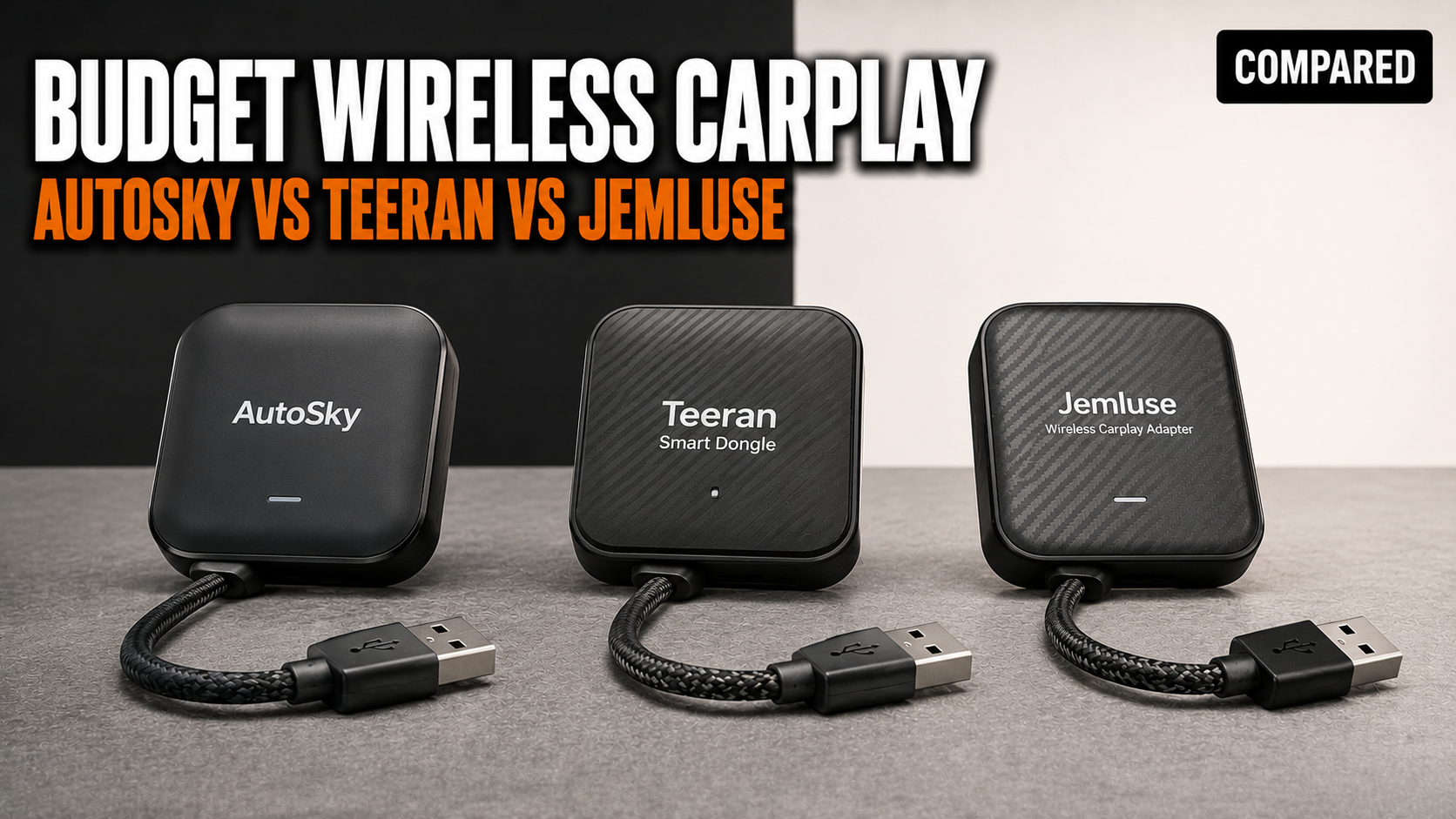

A budget wireless CarPlay adapter is worth buying if your car already has factory wired Apple CarPlay and you mainly want automatic connection for short drives. Among AutoSky, Teeran, and Jemluse, the simplest pick is Teeran for the smallest dash footprint, AutoSky for the lowest official renewed price, and Jemluse for buyers who want the most widely discussed model with stronger public review volume.
The catch buyers miss: these adapters don’t add CarPlay to a car that lacks it. Apple says CarPlay starts through a vehicle USB port or the car’s wireless capability, and wireless setup still requires Wi-Fi on the iPhone (Apple Support: Connect iPhone to CarPlay). A wireless adapter sits between those two modes. It uses the wired CarPlay USB port, then makes the iPhone connect wirelessly.
| Adapter | Best for | Current listed price | Main tradeoff | Why it matters |
|---|---|---|---|---|
| AutoSky wireless CarPlay adapter | Lowest-cost buyer who wants a basic wired-to-wireless converter | $24.99 renewed from AutoSky Renewed, reduced from $39.99 | Support and version clarity vary by listing | AutoSky has several adapter versions, so the manual and update path must match the exact model. |
| Teeran wireless CarPlay adapter | Smallest visible adapter in a tight USB area | $39.99 on Teeran’s official store | Very small body can block adjacent ports depending on USB placement | It is easier to leave installed, but port angle matters in older dashboards. |
| Jemluse wireless CarPlay adapter | Buyer who wants a better-known budget model with more public review chatter | $49.99 to $59.99 on Jemluse’s official store, with Amazon sale coverage as low as $28 in March 2026 | Some users report manual screen switching, static, call lag, or reconnect problems | Review volume is useful, but vehicle-specific behavior still decides whether it feels good. |
Which budget wireless CarPlay adapter should you buy?
Buy Teeran if you want the cleanest physical install, AutoSky if the price matters most, and Jemluse if you prefer a model with more third-party coverage and broader buyer chatter. The three products solve the same job: they convert a factory wired CarPlay USB port into a wireless CarPlay session for an iPhone.
The better choice depends less on the brand name and more on your car’s USB power behavior, infotainment boot speed, and whether more than one driver uses the same vehicle. Car Tech Studio’s adapter testing found quality adapters connecting in about 12 to 15 seconds, while budget adapters can take 20 to 30 seconds; a cable is still faster at roughly 3 to 5 seconds. That gap matters most on short errands, where a slow adapter may finish loading after you’ve already started driving.
For most US shoppers looking below $60, the Teeran wireless CarPlay adapter is the safest starting point because the official listing is current, the price is low, and the small body suits crowded center consoles. AutoSky is the value play if you’re comfortable buying renewed. Jemluse is the better research target if you want more public complaints and praise to read before buying.
How AutoSky compares as a budget wireless CarPlay adapter
The autosky wireless carplay adapter is the low-price pick when bought from AutoSky’s renewed store. AutoSky Renewed lists the AutoSky Wireless CarPlay & Android Auto Adapter at $24.99, down from $39.99, with a 1-year warranty and free shipping on that listing.
AutoSky’s best trait is price flexibility. The brand appears in multiple adapter versions across official, retail, Amazon, and manual pages, so buyers need to check the exact model name before trusting claims about Android Auto support, firmware updates, or startup settings. The WUA-5 manual says an AutoSky adapter can pair with multiple iPhones, but only connects to one at a time. It also says the system reconnects to the last-used iPhone by default.
That last-used-phone behavior is a real household issue. If two drivers leave Bluetooth and Wi-Fi enabled, the adapter may grab the wrong phone, especially when both people are near the car during startup. AutoSky’s manual tells users to turn off Wi-Fi and Bluetooth on the currently connected iPhone before pairing a different one. That’s workable for a solo driver. It’s annoying in a shared family car.
AutoSky also exposes one of the most useful technical truths: wireless CarPlay uses Wi-Fi for the active session. The AutoSky manual says no other Wi-Fi connection can be used while the adapter’s wireless CarPlay connection is active, and it tells users to disconnect interfering Wi-Fi networks if needed. That explains why some drivers lose home Wi-Fi while sitting in the driveway or see strange behavior when a dashcam or hotspot is also broadcasting inside the car.
How Teeran compares as a budget wireless CarPlay adapter
The teeran wireless carplay adapter is the best fit if you want a small adapter that can stay in the USB port without dangling. Teeran’s official 2025 listing prices it at $39.99 and describes it as a mini USB adapter for factory wired Apple CarPlay cars.
Teeran’s official page claims dual-band Wi-Fi at 2.4 GHz and 5 GHz, auto-reconnect, online updates, iOS 10+ support, and USB-A plus USB-C adapter support. It also says the 2025 model is 50% smaller and uses side vents for heat control. Treat the 100% performance and 35% cooler claims as brand claims rather than independent lab results unless you can verify them on the seller listing before publish.
The strongest reason to choose Teeran is physical fit. SlashGear’s 2025 coverage described the Teeran adapter as roughly 1 inch by 1 inch, with side vents, USB extension cables, FCC certification, planned firmware updates, and about 4.1 stars from 1,700+ Amazon reviewers at the time of publication. A small adapter matters in cars where the wired CarPlay port sits in a covered cubby, under the HVAC controls, or next to another USB port.
Teeran is still a budget adapter. Expect some delay after engine start, and expect a short learning phase if your car’s infotainment system asks you to approve CarPlay each time. If your vehicle has a recessed USB-A port, use the short extension cable rather than forcing the mini adapter into a tight angle.
How Jemluse compares as a budget wireless CarPlay adapter
The jemluse wireless carplay adapter is the best-known option in this three-brand comparison. Jemluse’s official store lists a Cosmic Gray model at $49.99 and an All Black model at $59.99, while Autoblog reported an Amazon sale price of $28 in March 2026. For a budget buyer, that price swing matters. Jemluse can be a good deal during marketplace promotions and a weaker deal at full official-store pricing.
The brand has more public coverage than AutoSky or Teeran. SlashGear reported that the Jemluse adapter was priced under $80 on Amazon in November 2025, measured 2.56 inches by 1.57 inches, weighed 50 grams, included about a 5-inch cable, and had a 4.4-star average from more than 5,900 Amazon customers at that time. Autoblog’s 2024 adapter roundup listed Jemluse at $69.95 and named 5.8 GHz Wi-Fi, Bluetooth 5.3, an A7 dual-core chip, USB-C, and a 1-year warranty.
Jemluse’s official FAQ gives a plain explanation of how these devices work: the adapter plugs into the car’s USB port, pairs with the iPhone through Bluetooth, then switches to Wi-Fi for data transfer. That is the right expectation to set. It also means Wi-Fi and Bluetooth must remain available for startup, and some connection failures come from iPhone settings rather than the adapter itself.
Jemluse has the most mixed public failure reports in this set, partly because more people talk about it. SlashGear cited buyer complaints about shared-car pairing, static, Wi-Fi trouble, and call lag as high as 9 seconds. A Reddit user also reported that a Jemluse unit connected but did not auto-switch a 2020 Nissan Rogue to the CarPlay screen, forcing a manual tap each time. Those reports don’t make Jemluse a bad product. They show why vehicle-specific behavior matters more than the claim printed on the product card.
Compatibility rules before you buy
A budget wireless CarPlay adapter only works if your car already supports wired Apple CarPlay through USB. It will not add CarPlay to a basic Bluetooth stereo, a screen that only has Android Auto, or a car with a charge-only USB port.
Apple’s own setup path starts with the vehicle’s CarPlay support: wired CarPlay uses a USB port, and wireless CarPlay requires the car stereo to be in wireless or Bluetooth mode with Wi-Fi enabled on the iPhone (Apple Support). Third-party adapters borrow the wired CarPlay port and create the wireless part themselves.
Check these 5 things before buying:
- Your car launches CarPlay when the iPhone is connected by cable.
- The USB port you plan to use is the data port, not a charge-only port.
- Your iPhone supports CarPlay and has Wi-Fi plus Bluetooth enabled.
- The adapter listing names iPhone support for your iOS version.
- Your return window is long enough to test cold starts, short errands, phone calls, and two-driver use.
The return window matters because the same adapter can behave differently in a Toyota, Hyundai, Subaru, Ford, Mazda, Honda, or Nissan. The adapter is only one part of the chain. The car’s head unit decides how quickly the CarPlay screen opens, whether it auto-switches, and how it behaves after a firmware update.
Lag, startup time, and audio delay
All wireless CarPlay adapters add some delay compared with a cable. The useful question is whether the delay gets in your way during normal driving.
Car Tech Studio measured quality wireless CarPlay adapters at about 12 to 15 seconds from vehicle start to working CarPlay, budget units at 20 to 30 seconds, and wired CarPlay at about 3 to 5 seconds. CarXplorer’s 2026 adapter review also found no true zero-delay result across tested adapters, with track-skip input lag around 0.8 to 1.5 seconds.
Those numbers match how budget adapters feel in real use. Navigation is usually fine once connected. Music controls feel a beat slower. Video playback through a phone is a poor test because wireless CarPlay was not designed to make phone video and car audio stay perfectly synced. AutoSky’s manual states that audio and video can be out of sync during phone video playback and describes this as inherent to wireless CarPlay systems.
If you care about hi-fi audio or instant button response, keep using a cable for long drives. If you mostly use Maps, podcasts, Siri, and short calls, a budget adapter is usually acceptable after the first week of adjustment.
Multi-driver and always-powered USB issues
Shared cars expose the weakest part of budget wireless CarPlay adapters. The adapter may reconnect to the last-used iPhone, grab the wrong phone from inside the house, or refuse to switch drivers until one person disables Wi-Fi and Bluetooth.
AutoSky’s manual is unusually direct here. It says the adapter can be paired with multiple iPhones, but only one can connect at a time, and it reconnects to the last-used iPhone by default. That means the second driver may need to turn off the first driver’s wireless radios, delete a pairing record, or use the adapter’s web settings page before the car behaves.
Some vehicles also keep the CarPlay USB port powered for a short time after shutdown. The AutoSky manual says an indicator light staying on briefly after the car is switched off can be normal because the car’s power supply takes a moment to shut down. In some electric vehicles and hybrids, owners report longer USB power behavior, which can keep the phone attached to the adapter when the driver is already home. {{VERIFY: specific vehicle models where the wired CarPlay USB port stays powered after shutdown long enough to keep a wireless adapter connected, check owner forums and vehicle manuals for Hyundai Ioniq 5, Kia EV6, Ford Maverick, and Subaru Crosstrek}}
This is the failure mode that rarely appears in polished product listings. If your driveway is close to your living room, your phone may connect to the car before you leave. If you share the car, the adapter may choose the wrong driver. If your car boots slowly, you may need a delay-start setting.
Setup and troubleshooting checklist
Start with a clean setup. Delete old CarPlay entries from the iPhone, delete old Bluetooth entries from the car if needed, then connect the adapter to the same USB port that already works for wired CarPlay.
Use this order:
- Start the car and wait for the infotainment system to fully wake.
- Plug the adapter into the wired CarPlay USB port.
- On the iPhone, keep Wi-Fi and Bluetooth on.
- Pair with the adapter’s Bluetooth name.
- Approve CarPlay when iOS asks.
- Wait for the adapter to create its Wi-Fi connection.
- Turn on Auto-Join for the adapter network if your iPhone exposes that option.
If CarPlay does not start, try the boring fixes first: unplug the adapter, restart the iPhone, forget the adapter’s Bluetooth record, forget the adapter’s Wi-Fi network, and pair again. AutoSky’s manual also gives a firmware update path through the adapter Wi-Fi network using password 88888888 and browser address 192.168.2.1; it says firmware updates are best reserved for problem cases, rather than done automatically on a working adapter.
For cars that show a black screen or refuse to start CarPlay quickly enough, AutoSky’s manual mentions a delay-start adjustment and recommends 10 or 15 seconds for some vehicles. That detail matters because a cheap adapter can look defective when the car’s head unit simply isn’t ready to accept CarPlay during the first seconds after startup.
Who should skip a budget adapter
Skip AutoSky, Teeran, Jemluse, and most low-cost wireless CarPlay dongles if your car does not already launch wired Apple CarPlay through USB. Buy a CarPlay head unit or vehicle-specific retrofit instead.
You should also skip a budget adapter if you make lots of work calls in the car and cannot tolerate call audio problems. User complaints around static, lag, and microphone behavior are uncommon enough that many buyers are happy, but common enough that a daily caller should test hard during the return period.
Shared-car households should be careful. A product page may say multi-user support, but AutoSky’s manual still says one iPhone connects at a time, and SlashGear cited Jemluse buyers who found shared-car pairing slower than using a cable. For a couple sharing one commuter car, that can become the daily annoyance.
Long-road-trip drivers should keep a charging cable in the car. Wireless CarPlay uses Wi-Fi, the phone screen may still wake for navigation prompts, and wireless charging pads in cars often charge slowly while the phone is warm. A budget wireless adapter is convenient for short trips. A cable is still the reliable backup.
Final recommendation
For most people, start with the Teeran wireless CarPlay adapter because it is compact, current, and reasonably priced at $39.99 from the official store. Choose the AutoSky wireless CarPlay adapter if the renewed $24.99 listing is available and you want the cheapest path into wireless CarPlay. Choose the Jemluse wireless CarPlay adapter when it drops near sale pricing and you want more public review history before buying.
The right test is simple: use it for 1 week before the return window closes. Test a cold start, a 5-minute errand, a phone call, a navigation route, and a second driver’s iPhone. If it passes those 5 cases in your car, the adapter is doing its job.