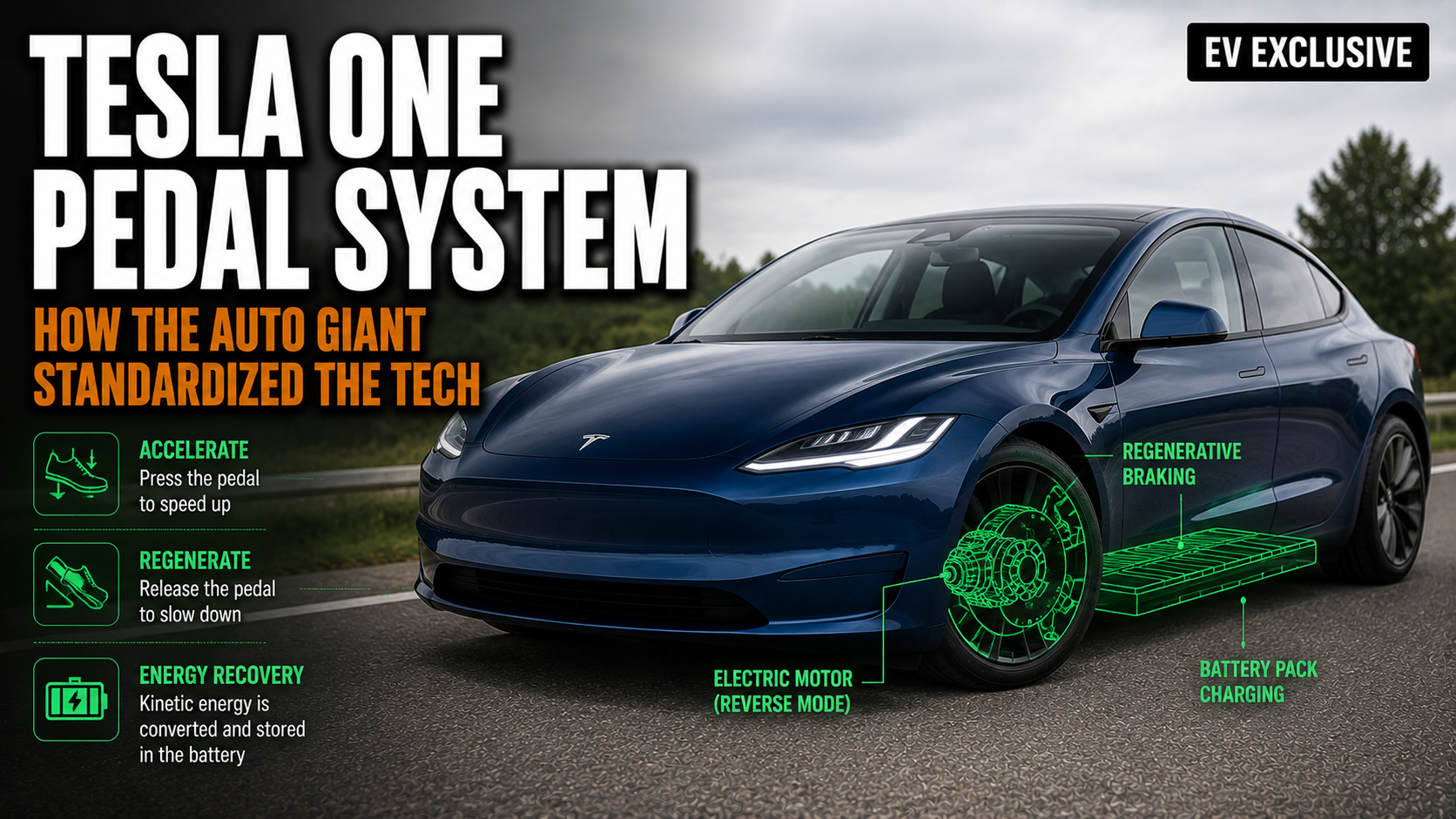

Yes, Tesla has one-pedal driving — and it’s been standard across the entire lineup since the early Model S days. Every current Tesla (Model 3, Model Y, Model S, Model X, and Cybertruck) supports one-pedal driving through its regenerative braking system. When you lift your foot off the accelerator, the electric motor reverses direction and acts as a generator, slowing the car and feeding energy back into the battery. Depending on how you configure your stop behavior, the car can come to a complete, unassisted stop.
What most guides miss: Tesla’s implementation is fundamentally different from nearly every other EV on the market. The brake pedal in a Tesla is 100% friction brakes only. No regeneration happens when you press it. That single engineering decision changes how you should use one-pedal driving in a Tesla versus a Hyundai, Nissan, or Ford.
Quick facts:
| Feature | Tesla (Model 3/Y/S/X) | Tesla Cybertruck |
|---|---|---|
| One-pedal driving available? | Yes (Standard & Low regen) | Yes (fixed, not adjustable) |
| Full stop without brake? | Yes (Hold mode) | Yes |
| Brake pedal triggers regen? | No — friction only | No — friction only |
| Settings menu location | Vehicle > Pedals & Steering | Vehicle > Pedals & Steering |
| Regen adjustability | Standard or Low | Not adjustable |
How One Pedal Driving Works in a Tesla
Simple physics, executed well. When you press the accelerator, the motor draws power from the battery to turn the wheels. When you lift off, the motor reverses its role — the wheels start turning the motor instead, generating electricity that flows back into the battery pack. That resistance is what slows the car down.
Tesla calls the intensity of this effect “regenerative braking.” Set it to Standard and the car decelerates aggressively the moment you come off the throttle — enough to bring the vehicle to a full stop in normal city driving. Set it to Low and the car coasts more, slowing gently like an ICE car in neutral.
Here’s the part that matters for efficiency: because Tesla’s brake pedal doesn’t blend regeneration into the stopping sequence (unlike most other EVs), choosing Low regen and then pressing the brake to stop wastes more energy than Standard regen in a Tesla specifically. Every time you use the friction brakes in a Tesla, that kinetic energy converts to heat — gone. In a Hyundai Ioniq 5, pressing the brake pedal first triggers regen and only brings friction brakes in later. Tesla doesn’t do that.
Keep regen on Standard. It pays off.
Does Tesla Have One Pedal Driving? Which Models Support It?
All of them. That said, there are meaningful differences between models.
Model 3 and Model Y offer the most flexible experience. You get Standard and Low regen options, plus the ability to choose your stopping behavior via the Stop Mode setting. These are the models where one-pedal driving works most naturally for daily commuting.
Model S and Model X follow the same system. Standard regen is strong enough to bring the car to a smooth stop from highway speeds with practice, and the larger battery size means the regenerated energy makes a more meaningful difference on range.
Cybertruck is the outlier. Consumer Reports noted that unlike most EVs — and unlike other Tesla models — the Cybertruck doesn’t let drivers adjust regen levels at all. You get one-pedal driving by default, and it stays that way. At very low speeds in parking lots or stop-and-go traffic, the deceleration rate felt too intense to some testers. It works fine on the highway and in standard city driving; it just takes more adjustment time than the sedan models.
How to Enable and Configure One Pedal Driving Tesla
One-pedal driving is on by default in every Tesla. You don’t activate it — you manage its behavior through two independent settings.
Step 1: Set your regen intensity
Go to Vehicle > Pedals & Steering > Regenerative Braking.
- Standard — Maximum regeneration. Car decelerates sharply when you lift off. Recommended for daily use, city driving, and anyone trying to maximize range.
- Low — Reduced regen. Car coasts further before slowing. Some drivers prefer this on highways. Note: this setting reduces the efficiency gains of one-pedal driving in a Tesla.
Step 2: Choose your Stop Mode
Still under Pedals & Steering, look for Stop Mode:
- Hold — The car brakes to a complete stop and stays stationary without you touching the brake. This is the true one-pedal driving experience. It holds on inclines too.
- Creep — Like an automatic ICE car in drive — the Tesla slowly rolls forward when near a stop and the brake isn’t applied. Familiar feel for new EV owners.
- Roll — The car coasts freely without added deceleration at very low speeds. Not one-pedal driving in the traditional sense.
For actual one-pedal driving: Standard regen + Hold mode. That combination handles 95% of real-world stops without your foot touching the brake.
One Pedal Driving EV: How Tesla Compares to the Competition
Not all one-pedal systems are the same. Here’s an honest comparison:
| EV Brand | System Name | Full Stop Capability | Regen Adjustability | Brake Pedal Triggers Regen? |
|---|---|---|---|---|
| Tesla | Regenerative Braking | Yes (with Hold mode) | Standard / Low only | No |
| Nissan Leaf/Ariya | e-Pedal | Yes (uses friction brake at very low speeds) | On/Off toggle | Yes (blended) |
| Kia EV6 / Ioniq 5/6 | i-Pedal | Partial (doesn’t fully stop on all models) | 5 paddle levels | Yes (blended) |
| Chevy Bolt | One-Pedal Mode | Yes | Button toggle | Yes (blended) |
| Ford F-150 Lightning | One-Pedal Mode | Yes | On/Off | Yes (blended) |
| Porsche Taycan | No true one-pedal | No — dial adjusts regen feel | Dial | Yes (blended) |
Tesla offers fewer regen intensity levels than Kia (which gives you five settings via steering wheel paddles). But Tesla’s system brings you to a complete stop — which Hyundai/Kia doesn’t fully do on all models. The Nissan Leaf’s e-Pedal does stop completely, but it uses the actual friction brakes in the last few mph to finish the job.
The catch? Tesla’s inflexibility on regen levels frustrated early owners enough that the company listened. They removed the adjustable regen setting in 2020 (leaving only the strong setting), then brought back Standard and Low options via an over-the-air software update in 2023 after sustained owner feedback.
What Nobody Tells You About Tesla’s One-Pedal System
A few real-world details the brochures skip:
The battery-full edge case. When your Tesla’s battery is at 100% charge, the car physically cannot push more energy into a full pack. So regen is disabled. But Tesla doesn’t want you to suddenly experience a car with no engine braking — that would be dangerous. The workaround: when you lift off the accelerator with a full battery, Tesla automatically applies the friction brakes to simulate the regen feel. You feel the same resistance, but you’re actually burning brake pads, not charging the battery. If you charged to 100% before a drive, the first few miles of “one-pedal driving” aren’t recovering any energy at all.
Brake disc rust. Because you barely touch the brake pedal in Hold mode, the brake rotors don’t get the regular scrubbing that keeps them clean. Rust builds up on the discs — visible as an orange film after a week or two of exclusive regen braking. It’s not a safety issue, but it looks alarming. The fix: once a week, find an empty road and do a few firm, deliberate stops from 40-50 mph to clean the rotors. This takes about 90 seconds and keeps everything in order.
Icy roads need special attention. On snow or ice, Standard regen can cause the rear wheels to lose traction abruptly when you lift off the throttle. Tesla’s traction control handles it reasonably well, but switching to Low regen in slippery conditions gives you more predictable behavior and reduces the chance of the rear stepping out. This is especially worth knowing in winter states.
Is One Pedal Driving Worth Using in a Tesla?
Worth it. Efficient.
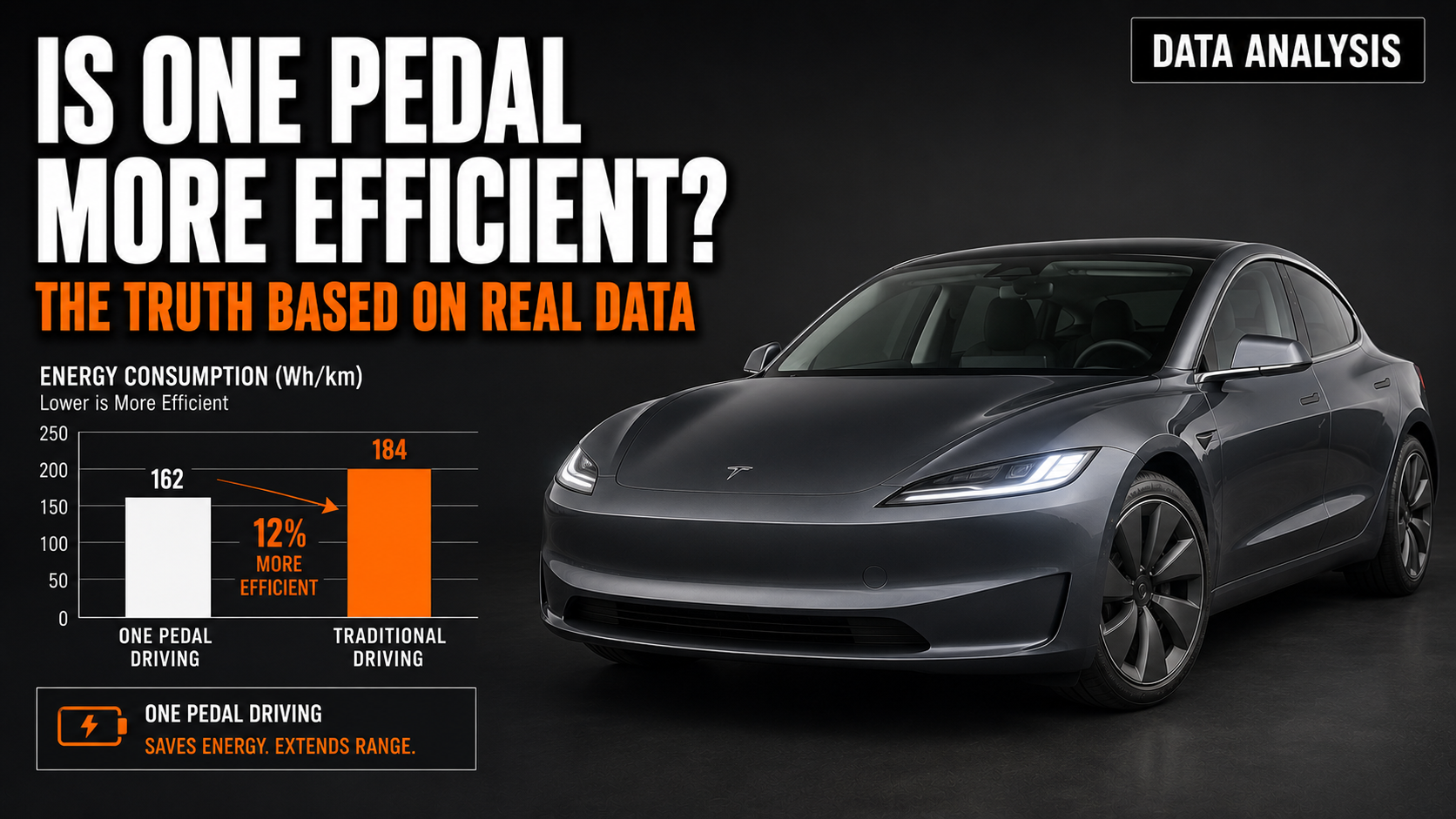
Research into regenerative braking efficiency suggests one-pedal driving can improve range by 2–9% versus driving with low regen and using the brake pedal, when comparing EVs with blended braking. In a Tesla, where the brake pedal is friction-only, the gap is even wider — using the brake pedal instead of regen wastes all of that kinetic energy as heat with no recovery at all.
On a 350-mile Tesla Long Range, a 5% range improvement from aggressive regen use translates to roughly 17 additional miles per charge — without any changes to driving speed or route.
Beyond range: brake pads last dramatically longer. Some Tesla owners report going 80,000–100,000 miles without a brake service, since the pads rarely see use.
When One Pedal Driving Isn’t the Right Call
Honest answer: it’s not ideal for everyone in every situation.
- New drivers may find the aggressive deceleration on Standard disconcerting. Starting on Low and working up makes sense.
- Highway driving with long open stretches provides very little regen benefit — the car barely brakes. The difference between Standard and Low becomes mostly irrelevant at constant speed.
- Passengers with motion sickness sometimes find the sharp lift-off deceleration uncomfortable, especially in stop-and-go city traffic.
- Winter driving (as noted above) can make Standard regen a handling risk. Low regen + conventional braking is safer on ice.
If any of those apply, Tesla’s Low setting plus deliberate brake use still works — just expect slightly less efficiency than the Standard + Hold combination.